DeepSeek-R1の1.58bit版は、量子化しているとはいえモデルサイズは131GBもある。本来の性能を発揮させるには160GBのメモリが必要だそうだ。20GBのメモリとCPUさえあればとりあえず動くのだが、遅すぎて実用的ではないということらしい。遅くてもいいのでどれくらい賢いのか試してみたいと思い、我が1000ドルPC(UM790 Pro メモリ64GB)で動かしてみた。
導入手順
下記のunslothのブログ記事に従った。環境はUbuntu22.04を使用した。
npakaさんが日本語訳された記事はこちらにある。
- llama.cppの導入
・aptgetコマンド実行にはsudoを付ける必要があった
・NVIDIAのGPUはないので「-DGGML_CUDA=OFF」としたsudo apt-get update sudo apt-get install build-essential cmake curl libcurl4-openssl-dev -y git clone https://github.com/ggerganov/llama.cpp cmake llama.cpp -B llama.cpp/build \ -DBUILD_SHARED_LIBS=OFF -DGGML_CUDA=OFF -DLLAMA_CURL=ON cmake --build llama.cpp/build --config Release -j --clean-first --target llama-quantize llama-cli llama-gguf-split cp llama.cpp/build/bin/llama-* llama.cpp - モデルのダウンロード
・export HF_HUB_ENABLE_HF_TRANSFER="1"で環境変数を設定
・Jupyter labから下記コマンドを実行from huggingface_hub import snapshot_download snapshot_download( repo_id = "unsloth/DeepSeek-R1-GGUF", local_dir = "DeepSeek-R1-GGUF", allow_patterns = ["*UD-IQ1_S*"], )
・カレントディレクトリ配下に3つの巨大モデルファイルがダウンロードされた
実行結果
カレントディレクトリで下記コマンドを実行する。llama.cppのパスとモデルファイルのパスは導入環境に合わせる必要がある。ollamaで実行するには3つのモデルファイルをマージする必要があるらしいが、llama.cppで実行する場合は3つのモデルファイルはマージ不要でそのまま実行できる。
./llama.cpp/llama-cli \
    --model DeepSeek-R1-GGUF/DeepSeek-R1-UD-IQ1_S/DeepSeek-R1-UD-IQ1_S-00001-of-00003.gguf \
    --cache-type-k q4_0 \
    --threads 16 \
    --prio 2 \
    --temp 0.6 \
    --ctx-size 4096 \
    --seed 3407 \
    --n-gpu-layers 0 \
    -no-cnv \
    --prompt "<|User|>9.9 and 9.11 which one is bigger ?<|Assistant|>"
コマンドのパラメータ指定値は、金のニワトリさんの下記の記事を参考にした。
上記ページのサンプルではゲームをPythonでコーディングさせているのだが、時間がかかりそうなので簡単な質問にした。
9.9 and 9.11 which one is bigger ?(9.9 と 9.11 はどちらが大きい ?)
回答は以下の通り。
9.9 and 9.11 which one is bigger ?<think>
Okay, let's see. I need to figure out which number is bigger between 9.9 and 9.11. Hmm, at first glance, both numbers are 9.something, so they're both between 9 and 10. But which one is larger? Let me break it down.First, I'll compare the whole number parts. Both numbers have a 9 as the whole number, so that part is the same. Now, I need to look at the decimal parts to determine which is larger.
For 9.9, the decimal part is 0.9, which is like 9 tenths. For 9.11, the decimal part is 0.11, which is 11 hundredths. Wait, but how does that compare? Maybe I need to make sure both decimals are in the same place value to compare them properly.
Let me think. 0.9 is the same as 0.90, right? Because 0.9 is 9 tenths, which is equivalent to 90 hundredths. So 0.90 versus 0.11. Now, comparing 90 hundredths and 11 hundredths, clearly 90 is more than 11. So 0.90 is greater than 0.11, which means 9.9 is greater than 9.11.
Wait, but let me check again. Maybe I'm missing something. If I write both numbers with the same number of decimal places:
9.9 can be written as 9.90 and 9.11 is 9.11. Now, comparing the tenths place first. For 9.90, the tenths digit is 9, and for 9.11, the tenths digit is 1. Since 9 is greater than 1, that already means 9.90 is greater than 9.11. So even without looking at the hundredths place, the tenths place is enough to determine that 9.9 is larger.
Alternatively, maybe converting them to fractions. 9.9 is 9 and 9/10, which is 99/10. 9.11 is 9 and 11/100, which is 911/100. Let's convert both to fractions over 100 to compare. 99/10 is equal to 990/100, and 911/100 is 911/100. Now, 990 vs 911. Since 990 is larger than 911, 990/100 is larger than 911/100, so 9.9 is larger than 9.11.
Another way to see it: 9.9 is only 0.1 away from 10, whereas 9.11 is 0.89 away from 10. So 9.9 is closer to 10, meaning it's larger than 9.11.
Wait, but maybe I confused the decimal places. Let's think numerically. 9.9 is nine units and nine tenths, while 9.11 is nine units, one tenth, and one hundredth. So when you break it down:
9.9 = 9 + 0.9
9.11 = 9 + 0.11Since 0.9 is greater than 0.11, the total of 9.9 is greater.
Yes, that makes sense. So even though 9.11 has two digits after the decimal, it's still less than 9.9 because the tenths place is so much smaller.
I think that's solid. So the answer is that 9.9 is bigger than 9.11.
</think>9.9 is greater than 9.11.
**Step-by-Step Explanation:**
1. **Compare Whole Numbers:** Both numbers have the same whole number part, which is 9.
2. **Compare Decimal Parts:**
- 9.9 has a decimal part of 0.9 (equivalent to 0.90).
- 9.11 has a decimal part of 0.11.
3. **Convert to Common Denominator:**
- Convert 0.9 to hundredths: 0.9 = 0.90.
- Now compare 0.90 and 0.11. Since 90 hundredths (0.90) are more than 11 hundredths (0.11), 0.90 is greater.
4. **Conclusion:** Therefore, 9.9 is greater than 9.11.**Answer:** 9.9 is bigger than 9.11. [end of text]
9.9 と 9.11 ではどちらが大きいでしょうか ?<think>
では、見てみましょう。9.9 と 9.11 ではどちらの数字が大きいかを判断する必要があります。うーん、一見すると、両方の数字が 9 何かなので、どちらも 9 から 10 の間にあります。でも、どちらが大きいでしょうか? 詳しく見ていきましょう。
まず、整数部分を比較します。両方の数字の整数は 9 なので、その部分は同じです。次に、小数部分を見て、どちらが大きいかを判断する必要があります。
9.9 の場合、小数部分は 0.9 で、10 分の 9 のようなものです。9.11 の場合、小数部分は 0.11 で、100 分の 11 です。待ってください、でも、どのように比較するのでしょうか? 適切に比較するには、両方の小数が同じ桁の値になっていることを確認する必要があるかもしれません。
考えさせてください。0.9 は 0.90 と同じですか? 0.9 は 9 分の 10 で、90 分の 10 に相当します。つまり、0.90 対 0.11 です。90 分の 10 と 11 分の 10 を比較すると、明らかに 90 は 11 より大きいです。つまり、0.90 は 0.11 より大きいので、9.9 は 9.11 より大きいことになります。
ちょっと待ってください。もう一度確認させてください。何か見落としているのかもしれません。両方の数値を同じ小数点以下の桁数で書くと、9.9 は 9.90 と書き、9.11 は 9.11 と書きます。
まず、小数点以下の桁を比較します。9.90 の場合、小数点以下の桁は 9 で、9.11 の場合、小数点以下の桁は 1 です。9 は 1 より大きいので、9.90 は 9.11 より大きいことになります。したがって、100 分の 1 の位を見なくても、10 分の 1 の位を見れば 9.9 が大きいことがわかります。
あるいは、分数に変換することもできます。9.9 は 9 と 9/10 なので、99/10 です。9.11 は 9 と 11/100 なので、911/100 です。比較するために、両方を 100 を超える分数に変換してみましょう。99/10 は 990/100 に等しく、911/100 は 911/100 です。次に、990 と 911 を比較します。990 は 911 より大きいので、990/100 は 911/100 より大きいため、9.9 は 9.11 より大きいことになります。
別の見方をすると、9.9 は 10 から 0.1 しか離れていないのに対し、9.11 は 10 から 0.89 離れています。つまり、9.9 は 10 に近い、つまり 9.11 より大きいということです。
ちょっと待ってください、小数点の桁を間違えたのかもしれません。数値的に考えてみましょう。9.9 は 9 単位と 9 分の 10 ですが、9.11 は 9 単位と 1 分の 1 と 100 分の 1 です。つまり、分解すると、
9.9 = 9 + 0.9
9.11 = 9 + 0.11
0.9 は 0.11 より大きいので、9.9 の合計は大きくなります。はい、その通りです。つまり、9.11 は小数点以下が 2 桁ですが、1 分の 1 の桁が非常に小さいため、9.9 よりも小さいということです。これは間違いないと思います。つまり、9.9 は 9.11 より大きい、というのが答えです。 </think>
9.9 は 9.11 より大きいです。
ステップごとの説明:
1. 整数を比較します: 両方の数値の整数部は同じで、9 です。
2. 小数部を比較します:
- 9.9 の小数部は 0.9 (0.90 に相当) です。
- 9.11 の小数部は 0.11 です。
3. 共通分母に変換します:
- 0.9 を 100 分の 1 に変換します: 0.9 = 0.90。- 次に、0.90 と 0.11 を比較します。90 分の 1 (0.90) は 11 分の 1 (0.11) より大きいため、0.90 の方が大きいです。
4. 結論: したがって、9.9 は 9.11 より大きいです。
回答: 9.9 は 9.11 より大きいです。 [end of text]
応答速度
0.51トークン/秒という結果になった。この結果はほぼ予想通りだ。
トータルの時間は1884秒で約30分もかかった。この簡単な質問に30分もかかるのかと思われるかもしれない。しかしこの質問はLLMにとっては難しい質問で、賢いLLMも間違えることがある。深く考えて正解してくれたことを評価すべきだろう。
llama_perf_sampler_print:    sampling time =      55.98 ms /   973 runs   (    0.06 ms per token, 17380.28 tokens per second)
llama_perf_context_print:        load time =   69540.63 ms
llama_perf_context_print: prompt eval time =   17010.42 ms /    16 tokens ( 1063.15 ms per token,     0.94 tokens per second)
llama_perf_context_print:        eval time = 1866823.36 ms /   956 runs   ( 1952.74 ms per token,     0.51 tokens per second)
llama_perf_context_print:       total time = 1884050.09 ms /   972 tokens
メモリ使用状況
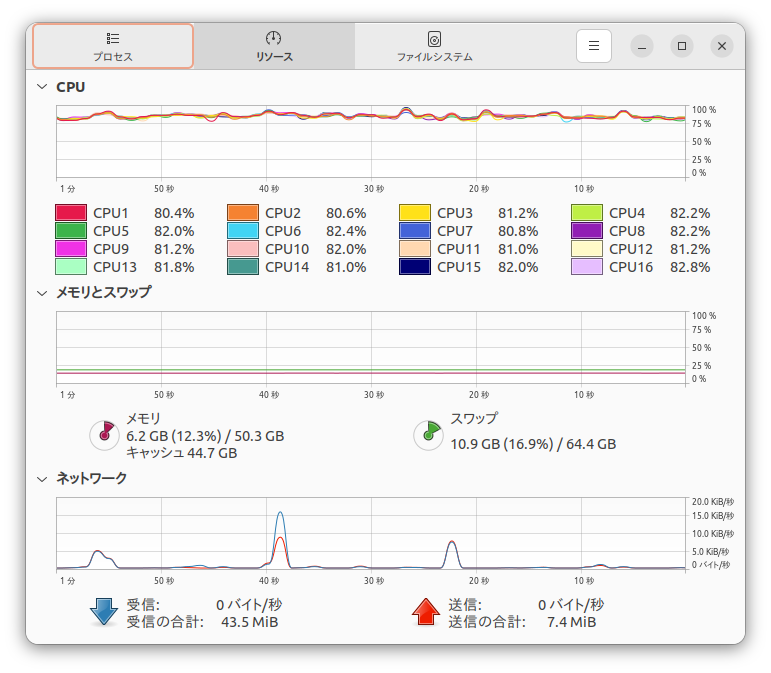
コマンド起動後、メモリは14GBあたりまで使用するが、その後スワップ領域にスワップされ、合計でも17GB程度しか使わない。確かにこれなら20GB以上のメモリがあれば動きそうだ。
CPUは16スレッド全て動き、定常的に80%以上の使用率で動いている。
どれくらい賢いのか
このモデルの賢さについては、金のニワトリさんが既にベンチマークされ上記ページで報告されている。それによると「o1-miniやgemini-2.0-flash-thinking-exp-1219に近いスコア」ということだ。
-ctx-sizeを4096とすると回答が打ち切られるまでに数時間かかる。--ctx-sizeを8192にして一晩動かし結果を見る、という繰り返しになるので私の検証には時間がかかりそうだ。
DeepSeek-R1の1.58bit版が快適に動く環境
160GB以上のメモリが必要となると、今市場にある機種では、Mac Sudio M2 Ultra 192GBしかないのか? これだと15.5トークン/秒は出るらしい。
なんか需要ありそうなのでDeepSeek R1 1.58-bitのMac Studioでの動作動画。
— はる猫大福(haru_arc) (@haru_arc) 2025年1月30日
環境
- Mac Sudio M2 Ultra 192GB
- LM Studio 0.3.9 Build 3
- llama.cpp b4585
- iogpu.wired_limit_mb=180000
もう限界状態で動作させてるから録画の影響で生成速度落ちているけど、録画してなければ15.5 tok/sはでてる pic.twitter.com/8oCVk4a2Vd
ドキュメントによると「最適な性能を得るには、VRAM + RAM の合計が少なくとも 80GB 以上であることを推奨」とあるので、私の環境でも24GB VRAM を搭載した RTX 4090 GPU をつなげばもう少しまともな速度になるかもしれない。まあ今はそこまでやるつもりはないので、次期マシン購入時の参考にしたい。
